Dev.to
How to add Dev.to to RedPanda with a personal API key.
Connect your agent today
Draft from chat, review in your calendar, and publish only what you approve.
Overview
Note
Operators and self-host installs do not register a Dev.to developer app or add Dev.to operator keys to the backend. Each account just pastes their own API key in the dashboard.
You connect with a personal API key from your Dev.to Settings.
Danger
Anyone with the key can publish as that Dev.to user. Revoke it in DEV Settings if it leaks, then reconnect the channel in RedPanda.
Note
RedPanda stores the API key on the server in encrypted form (see How RedPanda stores the API key).
Create an API key
Open DEV Settings → Extensions
Sign in to Dev.to and open Settings → Extensions.
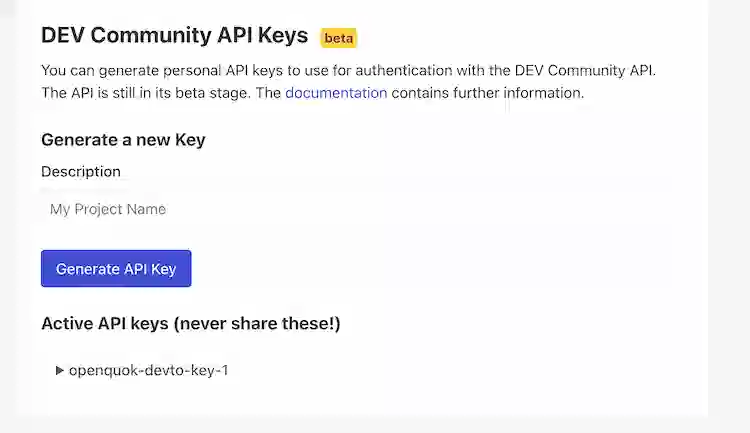
Generate a key
Create an API key. Copy it once — RedPanda keeps it on the server for publishing after you paste it (see How RedPanda stores the API key).
Connect in RedPanda
In the workspace, choose Add Channel → Dev.to, paste the key, and connect. RedPanda calls the DEV current-user endpoint to confirm the key, then saves the channel.
To refresh an existing channel, open the same credentials form (do not expect a platform OAuth redirect).
Compose settings
The post body is markdown. Title, tags, cover, organization, series, and canonical URL live in Dev.to settings (composer or CLI).
| Setting | Keys |
|---|---|
| Title | title or devto.title (required, min 2 characters) |
| Tags | tags — up to 4 names; strings or value/label objects |
| Cover | main_image / mainImage with a path from a prior upload |
| Canonical URL | canonical (aliases canonical_url, canonicalUrl) |
| Organization | organization (id; aliases organization_id, organizationId) |
| Series | series or devto.series — free-text name; creates the series on Dev.to if missing |
Discover the typed schema with openquok integrations:settings. List tag and organization options with openquok integrations:trigger tags and organizations.
Features
Supported
| Feature | Details |
|---|---|
| Connect | Personal API key from DEV Settings → Extensions |
| Article body | Markdown in the post editor (no separate markdown editor) |
| Title | Required; at least 2 characters |
| Tags | Up to 4 names |
| Cover image | Optional; recommended 1000×420 |
| Organization | Optional; publish under an organization the key can access |
| Series | Optional free-text name; Dev.to creates the series if missing |
| Canonical URL | Optional syndication URL |
| Analytics | Account and per-article page views, reactions, and comments (7 / 30 / 90 days) |
| Tools | tags and organizations via integrations:trigger |
| Body length | Up to 100,000 characters |
Tip
CLI walkthroughs: CLI Examples — Dev.to.
Not supported
| Feature | Notes |
|---|---|
| Operator OAuth app | No RedPanda env keys; users paste their own API key |
| Public OAuth connect | Dashboard only |
| Follow-up comments | Not implemented |
How RedPanda stores the API key
Workers need a reversible API key on the server to call DEV at publish time (a hash is not enough).
| Layer | What happens |
|---|---|
| Browser | Paste once in Add Channel — not kept in localStorage |
| APIs | Connect and list responses omit token fields |
| Database | AES-GCM on the channel when INTEGRATIONS_TOKEN_ENCRYPTION_KEY or SECURITY_SECRET is set |
Create and rotate keys in DEV Settings → Extensions. Protect your server encryption key and database backups like any other secret.