Claude Cowork
Connect RedPanda MCP to Claude Cowork via custom connectors or managedMcpServers organization settings.
Connect your agent today
Draft from chat, review in your calendar, and publish only what you approve.
Prerequisites
- Access to Claude Cowork organization settings (admin or connector manager).
- An RedPanda programmatic token (opo_) scoped to the workspace whose channels agents should manage.
Overview
Claude Cowork registers remote MCP servers at the organization level — either through the Custom connectors UI or a managedMcpServers JSON block in org settings. RedPanda uses streamable HTTP transport; server name should be redpanda.
Setup
Generate your token
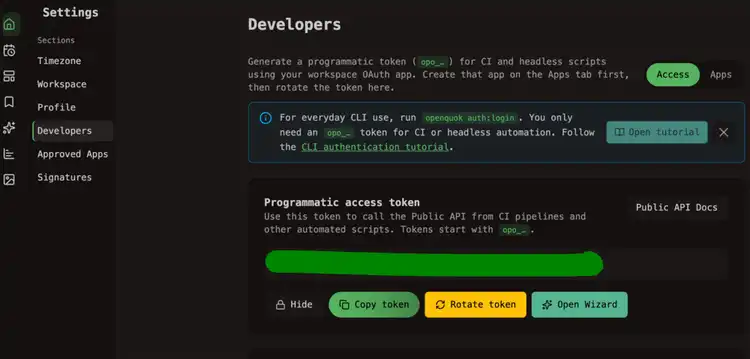
In the RedPanda app, open Account → Settings → Developers → Access. Create an OAuth app if prompted, then generate an opo_… token.
Add the connector JSON
Paste one of the following arrays into Custom connectors or managedMcpServers (exact field name depends on your Cowork admin console):
Save and propagate
Save organization settings. Cowork members may need to start a new session before redpanda tools appear.
Verify
In a Cowork chat, ask:
List my connected social media accounts
The agent should call integrationList for the workspace tied to the token.
Workspace scope
Each opo_ token is bound to one RedPanda workspace. Use separate tokens or connectors if different teams need isolated channel lists.
Self-hosted API
Replace https://api-production-a424.up.railway.app with your BACKEND_DOMAIN_URL origin.